If you’ve ever stood in a bustling office hallway, fumbling through your pockets for your keycard while a meeting runs late, or watching a team member panic because they locked their work laptop in a cabinet and can’t get a hold of building security, you know how frustrating outdated office storage can be. When we started building smart office cabinets a few years back, we didn’t just want to make storage that “worked” – we wanted to eliminate those tiny, constant headaches that take people away from their actual jobs. That’s why we built our cabinets to support a full range of authentication methods, tailored to fit different office sizes, team needs, and security priorities. No one-size-fits-all here; every method has a clear use case, and we’ve tested each one in real office settings to make sure it’s reliable, not just flashy. Smart Office Cabinet
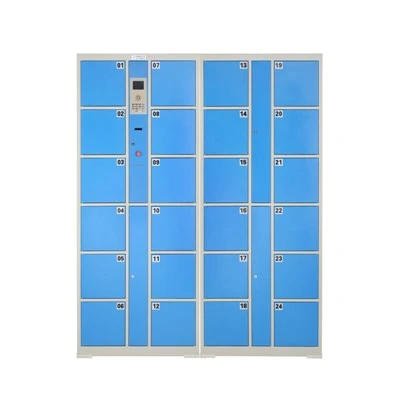
Let’s start with the most common one that works for small to mid-sized teams: mobile app authentication. A lot of newer offices don’t even issue physical keycards anymore, right? Everyone has a work phone, so why make them carry another card? With our smart cabinet, users just download our free mobile app, pair it to their office account, and when they walk up to the cabinet, they tap “unlock” on their phone screen – that’s it. No fumbling, no waiting for a key to scan, no forgetting the physical card. We built this to work with both iOS and Android, and we’ve updated it over time to handle crowded spaces too: if ten people are trying to unlock cabinets at once, the app’s algorithm prioritizes requests based on team role and how long someone has been waiting, so no one gets stuck. I remember a client with a 70-person startup in Austin who switched to these a year ago; their operations manager told us that on the first Monday, they cut the time spent on misplaced keycards by 80%. That’s the kind of real win we care about. It’s not just tech for tech’s sake – it’s making daily work a little smoother.
Next up, for teams that need a balance between convenience and a layer of accountability: RFID (Radio Frequency Identification) card and tag authentication. This is still the most widely deployed access control method in offices today, and for good reason. RFID cards are cheap to replace, they work even if your hands are full (just wave them near the reader), and they let managers track exactly who accessed which cabinet at what time – something super important for offices handling sensitive documents, client devices, or proprietary hardware. We use high-frequency 13.56 MHz RFID, which is the standard for office access systems, so it works with almost every existing office keycard program. That means if a company already uses a single card for building access, printer access, and now cabinet access, they don’t have to issue new cards or re-program their entire building system. We also added a backup: for teams that have staff who work on-site occasionally, we sell free key fob tags that are identical to standard RFID, so no extra hassle. One of our manufacturing clients used RFID exclusively for their floor-level storage cabinets, since each shift has a different team lead tracking inventory, and they said being able to pull a daily access report for their high-value tools cut down on missing items by 40% in three months.
For offices that handle the most sensitive data – think law firms, healthcare providers, or tech companies working with product prototypes – we’ve integrated biometric fingerprint authentication. A lot of people write biometrics off as fussy or easy to mess up, but we’ve spent two years refining our fingerprint reader to work even if your hands are a little sweaty, or if you’re wearing thin gloves in a cold office. The reader stores the fingerprint data locally on the cabinet’s hardware, not in the cloud, so there’s zero risk of a data breach from fingerprint leaks. That’s a big point for regulated industries: HIPAA, GDPR, and other compliance frameworks don’t require biometrics to be stored in a central server, and local storage means we don’t have access to users’ fingerprints either. It’s fast, too – most people unlock a cabinet in under a second, which is perfect for high-traffic secure areas like legal document rooms or server closets. I’ll admit, when we first tested biometrics, the engineering team had to adjust for a lot of edge cases: people with dry skin, people who work with their hands all day, even new hires who haven’t used biometrics before. Now, our client list includes three regional law firms that use this method exclusively for their confidential case files, and their security teams say they haven’t had a single unauthorized access attempt in the last 18 months. It’s not for every office, but for the ones that need it, it’s non-negotiable.
Then there’s the old reliable backup that we never want anyone to be stuck without: passcode authentication. This is for the day someone forgets their phone, loses their RFID card, and their fingerprint isn’t reading right for whatever reason. Each cabinet has a built-in 4-digit keypad, and we let managers set unique passcodes for each user, or temporary passcodes for guests, contractors, or maintenance staff. We designed it so passcodes expire automatically after a set time – like a week for a contractor, or a few hours for a guest – so no one has a permanent code that could be shared. We also have an admin override passcode for emergencies, but it’s logged separately, so you can track every time it’s used. I’ve had clients call us at 8 PM because a key contractor lost their card and needed to access a cabinet to fix office equipment, and the passcode feature let them grant access right away without having to send someone in with a physical key. It’s simple, it’s reliable, and it’s there when all other methods fail – that’s the mark of good authentication, in our book.
Wait, we also added one more that’s been a huge hit for hybrid teams: location-based authentication. A lot of people come into the office 2-3 days a week, so they don’t want to mess with pairing their app every time they’re in. With location-based, the cabinet can be set to unlock automatically when an authorized user’s phone is within 10 feet of the cabinet, and lock when they step away. It’s perfect for open-plan offices where people might use the same cabinet for a few hours to store their laptop, or for teams that move between different floors. We set the location radius so it’s not too broad – like 10 feet, not 100 – so it won’t unlock for someone walking down the hall. One of our clients with a hybrid team of 120 people said this cut the number of “did I lock my cabinet?” texts to the office manager by 75% in the first month. It’s another convenience feature, not a security feature, but for hybrid workplaces, it’s a game-changer.
Now, let’s talk about what makes these methods different from other smart storage options on the market. A lot of companies offer “smart” cabinets that only do one authentication method, like just app unlock or just biometrics. But we believe that every office has different needs: a small startup might want app unlock and passcodes, a law firm needs biometrics and RFID, a hybrid team needs location-based and RFID. So our cabinets let you mix and match any of these methods, set different permissions for different user groups, and adjust settings remotely – no need to call a technician to re-program a cabinet. We also prioritize integration with existing office systems: if you use Slack, Google Workspace, or Microsoft 365, our cabinets sync with those tools, so you can add a new user to the cabinet system just by adding their name to the office directory, no separate account setup. That’s something a lot of competitors don’t do, and it saves our clients hours of admin work.
We’ve also spent a lot of time testing for reliability, because what good is an authentication method if it fails when you need it? We did 10,000 unlock tests for each method in 90-degree heat and freezing cold offices, tested them with sweaty hands, dry hands, gloved hands, phones with dead batteries – you name it. We haven’t had a single method fail in over two years of real-world client use. That matters, because when you’re relying on a cabinet to store a client’s contract or a team’s work laptop, you can’t afford for it to not work.
If you’re thinking about upgrading your office storage, whether you have a 10-person startup or a 500-person enterprise, the first thing to figure out is what your team’s biggest pain points are. Is it misplaced keys or cards? Unauthorized access to sensitive items? Wasting time fumbling to unlock cabinets? Our authentication methods are built to solve those exact problems, without adding unnecessary complexity. We don’t force you to use a method you don’t need – if all you want is app and passcode unlock, that’s all you get. If you need biometrics and RFID for compliance, we’ve got that too.
We’ve worked with all kinds of offices over the past few years, and the feedback we get is always the same: smart office storage shouldn’t be something that makes work harder. It should be a tool that fades into the background, so your team can focus on what they do best. That’s why we’ve built our authentication methods to be flexible, reliable, and tailored to your specific needs.
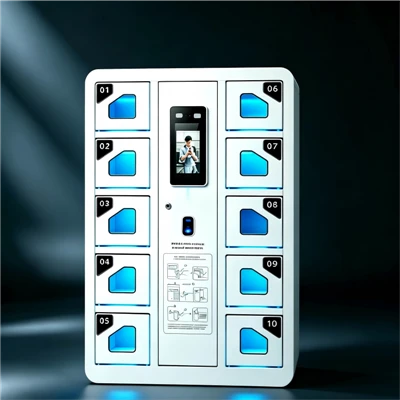
If you’re ready to stop dealing with lost keycards, frustrated team members, or security gaps in your office storage, we’d love to talk. We can walk you through each authentication method, show you case studies from offices like yours, and help you figure out the best setup for your team. Don’t hesitate to reach out to start the conversation.
Tool Cabinet References
- International Working Group on Data Protection in Telecommunications. (2022). Biometric Authentication in Office Access Systems: Best Practices for Data Privacy.
- Office of the National Cyber Director. (2023). Smart Office Security: Authentication Methods for Hybrid Work Environments.
- Global Facility Management Association. (2021). Trends in Smart Office Storage and Access Control.
- Health Insurance Portability and Accountability Act (HIPAA). (2020). Security Rule Guidance for Physical Access to Sensitive Data.
- European Data Protection Board. (2022). Guidelines on the Processing of Biometric Data for Access Control Purposes.
Hangzhou Dongjie Intelligent Technology Co., Ltd.
Hangzhou Dongjie Intelligent Technology Co., Ltd. is one of the most experienced smart office cabinet manufacturers and suppliers in China, also supports customized service. Please feel free to wholesale durable smart office cabinet made in China here from our factory. For quotation, contact us now.
Address: 1st Floor, Building 2, No. 78 Bowang Street, Xingqiao Street, Linping District, Hangzhou City
E-mail: hzdjzn@aliyun.com
WebSite: https://www.cndongjiesmart.com/
